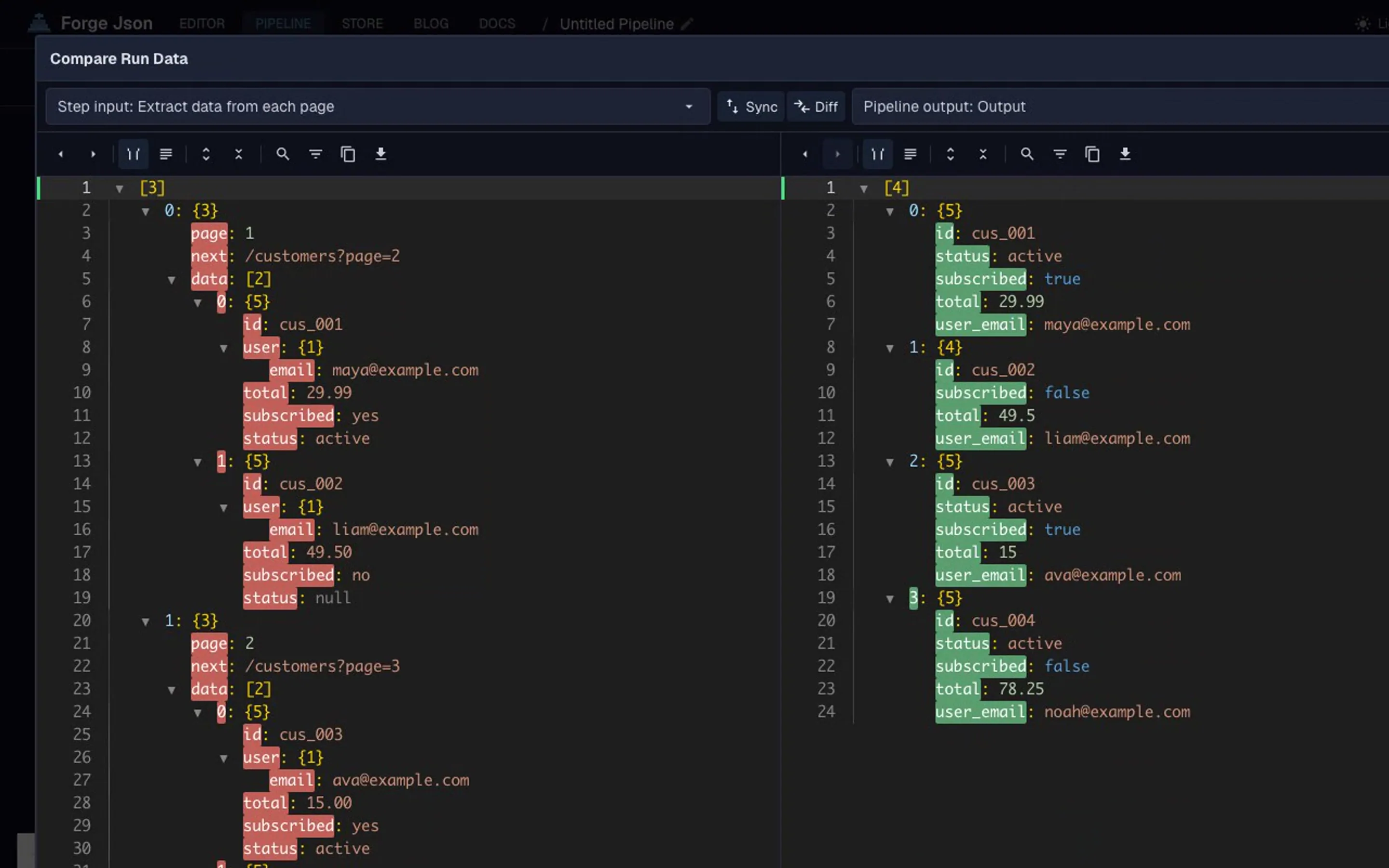
API field normalization is the process of converting inconsistent API values into a predictable, stable format so downstream systems can reliably process the data.
It is one part of API data cleanup: first remove noisy values, then normalize JSON data into consistent types, and finally validate the cleaned output before it reaches analytics, storage, or automation. Used in analytics pipelines, ETL workflows, and API integrations, normalization keeps messy JSON usable across systems.
How to normalize inconsistent API fields (quick answer)
Convert string numbers -> numbers
Standardize empty values -> null
Normalize booleans -> true/false
Enforce consistent field structure
Use this order when you need to fix inconsistent JSON, convert API response format issues, or standardize JSON fields before analytics, validation, or automation.
Normalize API fields in 3 steps
Clean the raw API response.
Normalize field types and values.
Validate the final structure.
This ensures consistent, reusable JSON for downstream systems. A stable contract means price is always a number or null, subscribed is always a boolean, and empty values follow one rule instead of several.
Common inconsistent API field formats
Numbers may arrive as strings, like "29.99" instead of 29.99
Empty values may appear as null, "", "N/A", or missing fields
Booleans may appear as true, "true", "yes", or 1
The same field may change shape between API responses
To make API data usable, normalize those fields before storing, validating, exporting, or sending them downstream.
The normalization pipeline
This workflow uses 3 steps:
Convert string numbers to numbers (age, price) using format-values
Map inconsistent values to standard values ("yes" to true, null to "unknown", empty fields removed) using map-values
Clean remaining noise (trim whitespace, drop dead fields) using clean-json
The combination handles both type consistency and structural cleanup. Each step has a single job, which keeps the workflow easy to audit and rerun.
Clean JSON is the cleanup step in the pipeline. Combine it with format-values and map-values for full normalization, especially when the API response has extra wrapper fields or dead values. For a deeper cleanup pass, use the clean API responses guide.
Type
Example
Notes
String number
"42"
Should often become 42
Empty value
"", "N/A", null
Should become one consistent empty state
Boolean-like value
"true", "yes", 1
Should become true or false
Mixed date value
"2026-04-01", "", null
Should become a valid date string or null
These formats usually appear when data comes from multiple services, older API versions, user-generated forms, or third-party integrations. Without a repeatable workflow, they turn into manual cleanup, one-off scripts, and fragile import logic.
For the underlying JSON data types and parsing behavior, MDN's JSON reference is a useful technical background.
Fix inconsistent JSON from APIs
To fix inconsistent JSON from APIs, start with the fields that downstream systems depend on most: ids, prices, booleans, dates, status values, and nested records that will be exported or flattened later.
The goal is to convert the API response format into one predictable shape. String numbers become numbers, boolean-like labels become booleans, empty values become null, and repeated records use the same keys. That makes it easier to standardize JSON fields before you send the data into analytics dashboards, CSV exports, validation rules, or automation workflows.
See how to normalize inconsistent API fields using a reusable JSON pipeline.
Real-world normalization examples
Ecommerce orders: convert total, tax, and shipping from string numbers into real numbers before revenue reporting.
Webhook payloads: convert "yes", "true", 1, and true into one boolean format before automation rules run.
Analytics pipelines: replace "", "N/A", and missing values with null so dashboards do not split the same meaning into separate buckets.
Third-party integrations: fix inconsistent JSON from different vendors before merging records into one customer, product, or order model.
Nested JSON responses: normalize customer.id, customer.email, and items[].price before flattening the response for CSV or analytics.
Fix mixed API field types
Start by choosing the final shape you want. Then normalize each unstable field into that shape.
You can copy this setup:
Normalize this API response:
- Convert age and price to numbers
- Convert subscribed to boolean
- Convert empty strings to null
- Replace missing or null status with "unknown"
- Keep id and email unchanged
For this example, the workflow does:
Converts string numbers into numbers (format-values)
Converts boolean-like values into real booleans (map-values)
Removes unclear empty values and replaces nulls with a default (map-values + clean-json)
You end up with:
age as a number
price as a number
subscribed as a boolean
status as a predictable string
How to choose normalization rules
Choose normalization rules based on what the field means downstream:
If the field is numeric, convert valid values to numbers and unclear values to null.
If the field is categorical, normalize values into a fixed enum such as "active", "paused", or "cancelled".
If the field is optional, choose one empty state: either null or omit the field.
If downstream validation, billing, analytics, or automation depends on the field, enforce a strict type instead of allowing fallbacks.
The most important rule is consistency. Do not let one dataset convert "" to null while another keeps it as an empty string unless that difference has a real business meaning.
API normalization checklist
Before reusing API JSON downstream, confirm that you have:
Converted numeric strings
Normalized booleans
Standardized empty values
Removed unused fields
Normalized nested fields that will be flattened later
Validated final structure
Common mistakes when normalizing API fields
The most common mistakes happen when cleanup, parsing, and validation rules blur together:
Converting empty strings inconsistently, such as keeping "" in one dataset and converting it to null in another.
Mixing numeric parsing with string fallback, which makes fields behave like numbers in one workflow and text in another.
Normalizing before removing noise fields, which wastes effort on values that should be dropped.
Applying different rules across datasets, especially when merging responses from multiple APIs.
Avoid these by defining the target shape first, cleaning obvious noise second, and then applying the same normalization rules to every response.
Common mistakes when normalizing API data
The highest-risk mistake is normalizing values without deciding what the final field should mean. For example, "", "N/A", and null may all look empty, but downstream tools need one rule.
Other mistakes include converting invalid numbers into 0, treating every unknown boolean as false, and changing nested records before deciding whether they should be flattened. When the rule is ambiguous, prefer null and validate the result instead of guessing.
What happens if you do not normalize API data?
Inconsistent API data creates hidden bugs that are hard to trace:
Validation fails silently due to type mismatches
Analytics dashboards split the same value across multiple categories
Automation rules trigger incorrectly
Downstream systems require defensive code for every field
Normalization prevents these problems by making field behavior explicit before the data reaches systems that assume stable types.
When should you normalize vs validate?
Normalize before validation when raw API fields have mixed types, empty values, or inconsistent labels. Validation checks whether the final JSON matches a schema; normalization makes the JSON stable enough for that schema to be useful.
Once your fields are predictable, downstream rules like required keys, type checks, and enum constraints can run reliably without false negatives caused by string-versus-number drift or empty-value ambiguity. If your pipeline cleans, normalizes, and then validates in that order, each stage has a single job and failures are easier to diagnose. Start by stabilizing shape with API response cleanup, normalize types and values here, then validate JSON against a schema to enforce the contract.
Normalize API fields: code vs no-code workflow
Code is useful when the response shape is small and stable, but field normalization gets expensive when the API keeps changing.
The script looks simple until edge cases arrive. A comparison is usually clearer:
Approach
Pros
Cons
Custom code
Flexible for small, stable response shapes
Fragile when fields change, hard to review, easy to scatter across imports
No-code JSON pipeline
Reusable, visible, previewable, easier to maintain across teams
Requires setup and a defined target shape
A no-code JSON workflow is stronger when rules need to be reused, reviewed, or adjusted. Non-developers can inspect the conversion rules, each normalization step can be previewed before export, and cleanup, normalization, and schema validation can stay separate.
For repeated API cleanup, a reusable workflow is easier to maintain than one-off scripts scattered across imports, reports, and automation jobs. It also targets the same need as "normalize JSON without code" and "JSON transformation tools": make the transformation visible, repeatable, and easy to run again.
Manual cleanup vs custom script vs JSON pipeline
Manual cleanup works for one file, but it breaks down when API responses keep changing.
Approach
Works for
Breaks when
Manual cleanup
One-off files and quick inspection
The API schema changes or the import repeats
Custom script
Stable internal APIs
Non-developers need to review or adjust rules
JSON pipeline
Repeated API cleanup, shared workflows, changing data
The expected output shape is not defined
Manual API data cleanup also hides transformation rules in spreadsheets, scripts, or ad hoc edits. A pipeline approach is repeatable, auditable, and scalable because the rules stay visible and can run again whenever a new response arrives.
JSON workflow pipeline
Use field normalization as one step in an end-to-end JSON workflow:
Clean API responses to remove noise, whitespace, null-heavy fields, and values you do not need.
Normalize fields with this guide so types, empty values, booleans, enums, and nested values follow one rule.
It means converting unstable API values into predictable formats, such as turning string numbers into numbers or empty strings into null.
Why do APIs return inconsistent field types?
APIs often combine data from multiple systems, old versions, user input, or third-party services. That can cause the same field to appear in different formats.
Should empty strings become null?
Usually yes, if an empty string means “no value.” Use null when you want downstream systems to treat the field as intentionally empty.
Can I normalize API fields without code?
Yes. A reusable JSON pipeline can normalize common field issues without writing custom parsing code every time.
Support material
Practical example and product context
Use these examples to understand the transformation and apply the same workflow in your own JSON tasks.
Before & After
Example Transformation
See how this workflow reshapes the sample material into clean output.
Input / OutputInputOutput
Input
{
  "id": "1001",
  "email": "maya@example.com",
  "age": "34",
  "price": "29.99",
  "subscribed": "yes",
  "last_login": "",
  "status": null
}
Output
{
  "id": "1001",
  "email": "maya@example.com",
  "age": 34,
  "price": 29.99,
  "subscribed": true,
  "status": "unknown"
}
Why this output is ready to use
The example shows mixed API field types such as string numbers, null values, and empty strings.
The workflow normalizes values into predictable JSON fields.
The final output can be reused in APIs, pipelines, CSV exports, or validation workflows.
Built with Cleanup pipeline
Open the sample input and generated pipeline in the editor.