Compare JSON API Responses (Diff Tool + Live Example)
Compare JSON API responses instantly. Detect added, removed, and changed fields between API outputs with a live JSON diff tool.
2026-02-048 min read
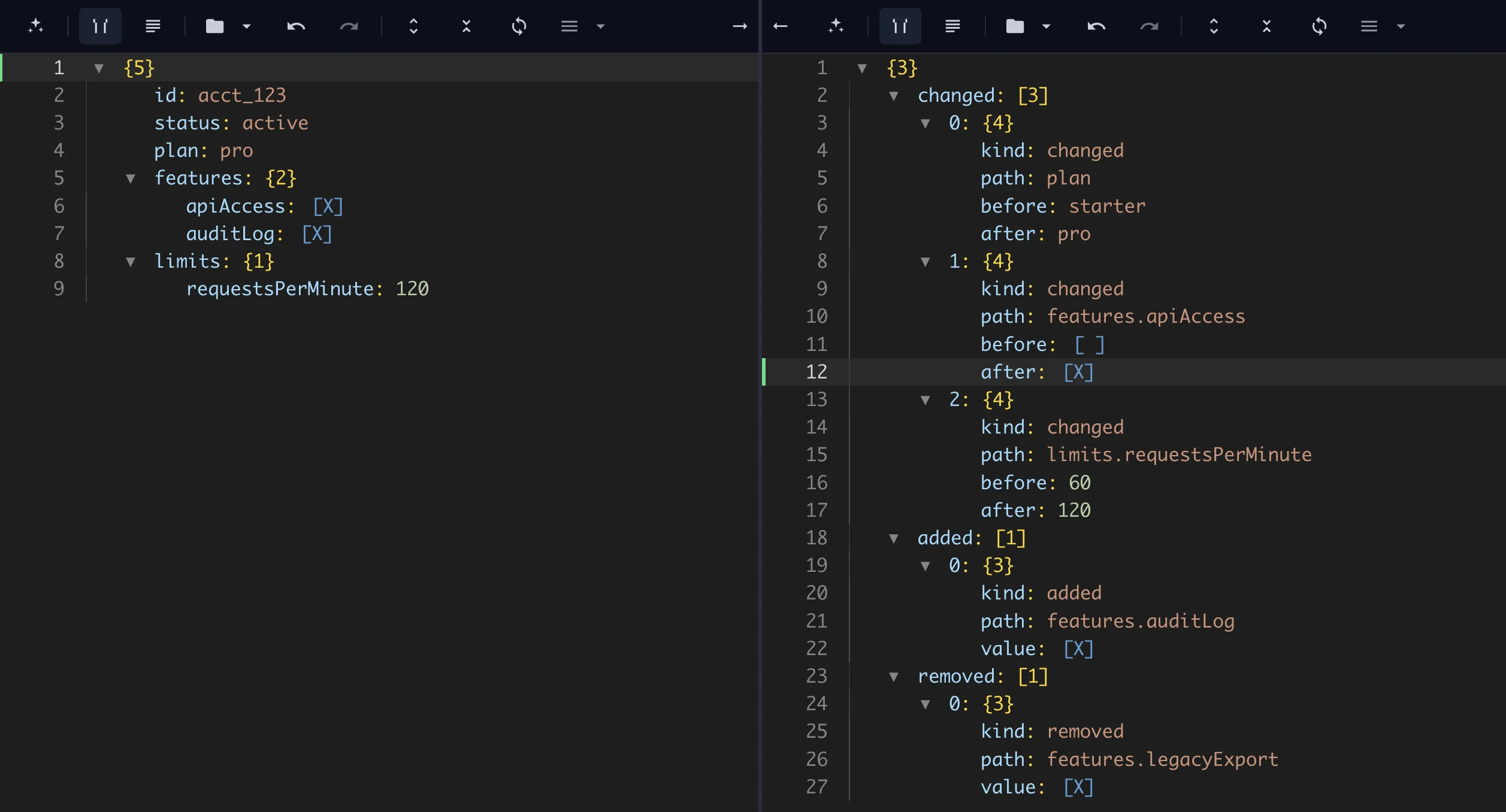
Compare JSON API responses instantly. This tool highlights differences between two API responses, including added fields, removed keys, changed values, and nested JSON path changes.
Use it as a JSON response diff tool when you need to compare API response JSON from staging and production, old and new endpoints, webhook retries, SDK upgrades, or vendor payload changes.
Compare JSON API responses instantly (live tool)
Output(✓)
1
2
3
4
5
6
7
8
9
10
11
12
{
"id":"acct_123",
"status":"active",
"plan":"pro",
"features":{
"apiAccess":true,
"auditLog":true
},
"limits":{
"requestsPerMinute":120
}
}
Output(✓)
1{
2"changed": [
3{
4"kind": "changed",
5"path": "plan",
6"before": "starter",
7"after": "pro"
8},
9{
10"kind": "changed",
11"path": "features.apiAccess",
12"before": false,
13"after": true
14},
15{
16"kind": "changed",
17"path": "limits.requestsPerMinute",
18"before": 60,
19"after": 120
20}
21],
22"added": [
23{
24"kind": "added",
25"path": "features.auditLog",
26"value": true
27}
28],
29"removed": [
30{
31"kind": "removed",
32"path": "features.legacyExport",
33"value": true
34}
35]
36}
Love the result?
Use this exact pipeline in your app, backend, or LLM workflow.
No setup needed. Works with curl, Node, Python.
Uses example data. For edited input, copy from the playground.
This API JSON diff report is ready for contract reviews, release checks, webhook audits, and analytics validation. It gives you a field-level answer instead of a noisy line-by-line text diff.
The playground inputs use the stable contract fields after removing volatile metadata such as request IDs, trace IDs, and timestamps. That keeps the report focused on changes consumers might actually depend on.
The report separates changed values from new and removed fields, so API reviewers can see exactly which paths changed between the previous response and the new response.
Replace the inputs above with your own API responses to test a staging deploy, webhook replay, SDK upgrade, or vendor payload change instantly.
Use this workflow via API with the JSON pipeline API guide, or open the payload in the JSON editor when you need to inspect and clean a response before comparing it.
Example: compare two API responses
Before: the previous API response, after removing unstable metadata, shows a starter plan with limited features.
A structured diff should report that plan, features.apiAccess, and limits.requestsPerMinute changed, features.auditLog was added, and features.legacyExport was removed. That makes the output easier to use in QA notes, release reviews, bug reports, and contract checks.
What this JSON response diff tool does
Use the JSON diff tool when you need to compare two API responses quickly. Paste the previous response into one side, paste the new response into the other side, and review the changed paths.
If your intent is specifically API contract drift, the focused API JSON diff page gives the same comparison engine with API-first language.
This API response comparison tool detects:
Added fields in the new response
Removed fields that existing clients may still expect
Modified values, booleans, strings, numbers, arrays, and objects
Nested JSON comparison changes such as features.apiAccess or limits.requestsPerMinute
Field-level diff output that is easier to review than raw text changes
What is API response comparison?
API response comparison is the process of checking two response payloads and identifying what changed. The comparison can happen between staging and production, old and new versions, webhook retries, SDK upgrades, or repeated pulls from the same endpoint.
The goal is not just to see that the text changed. The goal is to know which fields changed and whether those changes matter to consumers.
How to compare JSON API responses
Save the previous response as the baseline.
Save the new response from the endpoint, webhook, SDK, or environment you want to check.
Remove unstable fields such as requestId, traceId, createdAt, signatures, and timestamps when they are not part of the contract.
In the live example above, assume request-specific fields like requestId, traceId, and fetchedAt were removed before comparison. The remaining payload is the stable contract surface you want to review.
If you only care about a subset of the response, use Extract Fields from JSON before comparing. This keeps the report focused on stable contract fields.
How the JSON diff API workflow works
A JSON diff API workflow parses both responses as structured JSON before comparing them. That means it can compare nested objects, arrays, primitive values, and field paths without being distracted by whitespace, indentation, or key ordering.
The comparison looks for three main change types:
Added: a field exists in the new API response but not the baseline.
Removed: a field existed in the baseline but is missing from the new response.
Modified: a field exists in both responses, but the value or type changed.
For nested JSON comparison, the report should keep the path attached to each change. A changed value at customer.subscription.plan is more useful than a generic block of changed text.
Common API diff use cases
Debugging API changes after a backend deploy
Comparing staging vs production responses
Monitoring API regressions across scheduled checks
Testing webhook payload changes before updating handlers
Comparing vendor SDK output between versions
Validating transformed API data before CSV export or analytics ingestion
Why text diff is weak for API responses
Text diff tools compare characters and lines. API JSON often changes formatting, key order, or indentation without changing the contract. Text diff can also bury a single important nested field inside a large changed block.
Structured JSON diff compares parsed data. It understands object hierarchy, arrays, field paths, added keys, removed keys, and changed values. That makes the output easier to turn into a release note, bug report, QA checklist, or contract review.
Related tools and pages
JSON diff tool - compare JSON API responses in the browser.
What is the best way to compare API JSON responses?
Use a structured JSON diff so the report shows changed paths, added fields, and removed keys. Remove unstable metadata first so the diff focuses on contract changes.
Should I compare raw API responses or cleaned responses?
Compare cleaned responses when volatile fields are not meaningful. Keep raw responses when the exact payload is what you need to audit.
Can JSON diff catch API contract drift?
Yes. It can show removed fields, changed values, added nested objects, and type changes when those differences appear in the JSON payload.
Support material
Practical example and product context
Use these examples to understand the transformation and apply the same workflow in your own JSON tasks.
Before & After
Example Transformation
See how this workflow reshapes the sample material into clean output.
Inputs / OutputOutput
{
"id": "acct_123",
"status": "active",
"plan": "pro",
"features": {
"apiAccess": true,
"auditLog": true
},
"limits": {
"requestsPerMinute": 120
}
}
Output
{
  "changed": [
    {
      "kind": "changed",
      "path": "plan",
      "before": "starter",
      "after": "pro"
    },
    {
      "kind": "changed",
      "path": "features.apiAccess",
      "before": false,
      "after": true
    },
    {
      "kind": "changed",
      "path": "limits.requestsPerMinute",
      "before": 60,
      "after": 120
    }
  ],
  "added": [
    {
      "kind": "added",
      "path": "features.auditLog",
      "value": true
    }
  ],
  "removed": [
    {
      "kind": "removed",
      "path": "features.legacyExport",
      "value": true
    }
  ]
}
Config
1{
2"mode": "report"
3}
Why this output is ready to use
The primary input represents the new API response after volatile metadata has been removed.
The secondary input represents the previous API response baseline after the same cleanup.
The output separates stable contract changes from request-specific noise.
Built with Compare utility
Open the sample input and generated pipeline in the editor.