How to Debug API Changes (Fix Breaking Responses Fast)
Learn how to debug API changes, detect breaking API response changes, compare payloads, and fix JSON regressions with diff, validation, and pipelines.
2026-02-048 min read
API changes are hard to debug when the response is large, nested, or generated by multiple services. A request can still return 200 OK and valid JSON while silently changing a field that downstream code expects.
The fastest way to debug API response changes is to compare a known-good response against the changed response, identify added, removed, and modified fields, then trace the root cause back to the deploy, SDK, webhook, or upstream service that changed the payload.
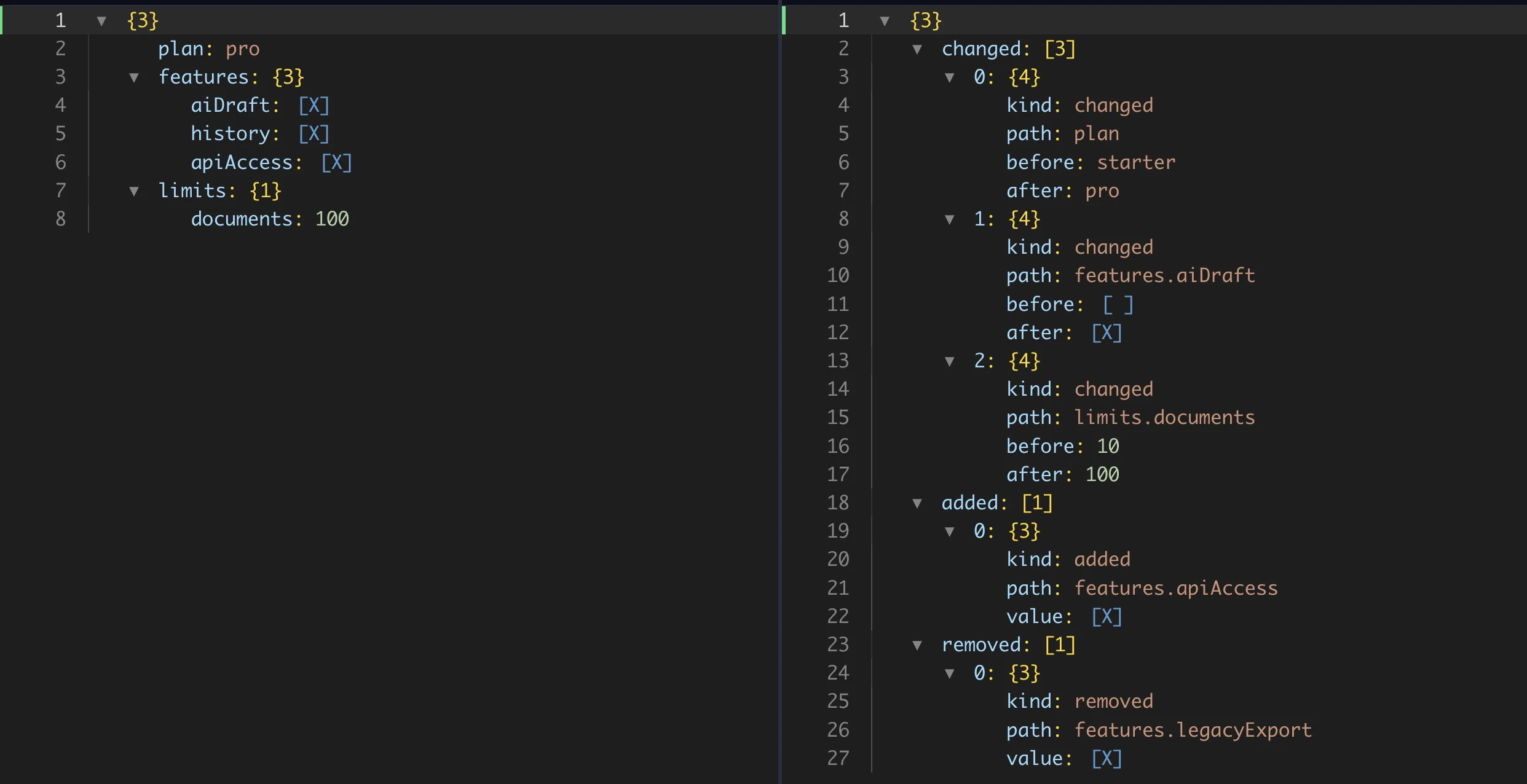
Use the live JSON diff below to detect breaking API changes, debug API response drift, and turn a vague "the API payload changed" bug into a concrete list of paths to fix.
Try debugging your API response here
Output(✓)
1
2
3
4
5
6
7
8
9
10
11
{
"plan":"pro",
"features":{
"aiDraft":true,
"history":true,
"apiAccess":true
},
"limits":{
"documents":100
}
}
Output(✓)
1{
2"changed": [
3{
4"kind": "changed",
5"path": "plan",
6"before": "starter",
7"after": "pro"
8},
9{
10"kind": "changed",
11"path": "features.aiDraft",
12"before": false,
13"after": true
14},
15{
16"kind": "changed",
17"path": "limits.documents",
18"before": 10,
19"after": 100
20}
21],
22"added": [
23{
24"kind": "added",
25"path": "features.apiAccess",
26"value": true
27}
28],
29"removed": [
30{
31"kind": "removed",
32"path": "features.legacyExport",
33"value": true
34}
35]
36}
Love the result?
Use this exact pipeline in your app, backend, or LLM workflow.
No setup needed. Works with curl, Node, Python.
Uses example data. For edited input, copy from the playground.
The report gives you a focused debugging checklist: changed values to verify, new fields to review, and removed fields that may explain broken consumers.
Replace the inputs above with your own baseline and changed API responses to debug the next response drift instantly.
What happens when an API changes
API breaking changes do not always look like outages. The endpoint may still respond, auth may still work, and the JSON may still be valid. The failure often appears later in a frontend view, webhook handler, ETL job, integration test, mobile app, or analytics pipeline.
Common symptoms include:
A frontend field renders blank after a deploy
A webhook handler stops routing events
A vendor SDK changes the response shape
A required field disappears from an API payload
A number becomes a string, boolean, or nested object
A data export gets new nested fields
A validation rule starts failing after a release
The debugging job is to find the input/output mismatch and identify the root cause: which response changed, which path changed, whether the change is expected, and what consumer or transformation needs to be updated.
How to debug API changes
Capture the previous API response.
Capture the current API response.
Diff the JSON structure.
Identify added, removed, and changed fields.
Trace the upstream cause.
Update transformation, validation, or consumer logic.
This is the core JSON diff API debugging loop. It works for staging vs production, old SDK vs new SDK, webhook replay checks, failing fixtures, and API response changed how-to-fix investigations.
Step-by-step API change debugging
Step 1: capture two responses
You need a baseline and a changed payload. The baseline might come from production, a previous deploy, a stored fixture, a contract test, or a customer report. The changed payload might come from staging, a new SDK version, a webhook replay, or a failing test.
Keep both responses as raw JSON until you know what changed.
Step 2: validate and format the JSON
Use JSON validator to confirm both responses parse. Then use JSON formatter if the payloads are hard to read. Formatting is not the same as debugging, but it makes review easier and prevents invalid syntax from wasting time.
Step 3: remove unstable fields
Many API responses include values that change every request:
request IDs
trace IDs
timestamps
signatures
pagination cursors
generated URLs
If those values are not part of the bug, remove or extract around them before diffing. Extract Fields from JSON helps when only a subset of paths matters.
Step 4: run the structured diff
Run the JSON diff tool and review the report by path. Look for removed required fields, changed enum values, type changes, newly added objects, and array shape changes.
For example, a bug may come from plan changing from starter to pro, features.apiAccess appearing unexpectedly, limits.documents changing from 10 to 100, or features.legacyExport disappearing from a response body.
Not every difference is a bug. Some changes are expected after a release. The useful question is whether the changed path is part of a contract. If a downstream consumer reads that path, update the consumer, restore the field, or document the new response shape.
Step 6: automate repeated checks
If the same comparison happens often, turn it into a repeatable workflow with JSON pipeline tools. A pipeline can validate, clean, extract, diff, and export response changes without rebuilding the process each time.
Example: debugging a broken API response
Here is a small API payload change that can break real code.
Before:
{
"price": 100
}
After:
{
"price": "100",
"currency": "USD"
}
What breaks:
Code that calculates totals may fail because price changed from a number to a string
Validation may fail if the schema expects price to be numeric
A downstream export may add a new currency column unexpectedly
Why it breaks:
The API response changed shape even though the field name stayed the same
A line-by-line review might miss the type change in a large payload
A structured JSON diff makes the changed path obvious: price changed from 100 to "100", and currency was added
How to fix it:
Update the API contract or restore the original numeric price
Normalize the changed response before consumers read it
Add validation so the same API payload changed debugging case fails early next time
Common causes of API changes
APIs change for normal engineering reasons, not just mistakes. Debugging is easier when you know what kind of upstream cause to look for.
New features add fields, nested objects, or enum values
Simplification removes legacy fields that old clients still read
Maintainability work renames keys or moves data into nested objects
SDK upgrades normalize values differently
Database migrations change nullability, defaults, or numeric types
Webhook versions add or remove event payload fields
Backend services return partial data during errors or retries
These causes can all produce API breaking changes when the consumer expects the old response shape.
Tools to debug API changes
Use this tool stack when you need to debug API response changes quickly:
API JSON diff for endpoint and webhook payload comparison
JSON validator to confirm both responses parse before diffing
Clean JSON to remove request IDs, timestamps, and noisy metadata
JSON pipeline tools to automate repeatable validation, cleanup, and diff checks
Prevent API breakages
The best API debugging workflow becomes a prevention workflow. Once you know which fields are contract-sensitive, validate them before release and compare them across environments.
To prevent API breakage:
Store known-good response fixtures for important endpoints.
Validate new responses against expected schema rules.
Compare staging and production payloads before release.
Ignore volatile metadata such as request IDs and timestamps.
Run JSON diff checks in a repeatable pipeline.
Review added, removed, and changed paths before consumers break.
This creates a practical loop: debug the API change once, encode the check, then catch future regressions earlier.
Fix API changes automatically with pipelines
When the same issue repeats, a manual diff is only the first step. Use JSON pipeline tools to validate payloads, clean unstable fields, extract contract paths, compare API responses, and export a change report.
For API access, start with the JSON pipeline API guide. That lets you turn API regression debugging into a reusable workflow instead of a one-off investigation.
Capture the previous and changed responses, validate both payloads, remove unstable metadata, and run a structured JSON diff to review changed paths. Then trace the changed path back to the deploy, SDK, webhook, or service that produced it.
How do I detect breaking API changes?
Compare API responses from before and after the release. Breaking changes usually show up as removed fields, changed types, renamed keys, enum changes, or nested shape changes that existing consumers still depend on.
What should I check when an API response changed?
Check removed required fields, type changes, changed enum values, new nested objects, array shape changes, and volatile metadata. Then confirm which downstream code reads the changed paths.
What fields should I ignore when diffing API responses?
Ignore fields that change every request unless they are part of the bug: timestamps, request IDs, trace IDs, signatures, and generated cursors.
When should I automate API diff checks?
Automate the workflow when you compare the same endpoint across releases, environments, vendors, or customer accounts.
Support material
Practical example and product context
Use these examples to understand the transformation and apply the same workflow in your own JSON tasks.
Before & After
Example Transformation
See how this workflow reshapes the sample material into clean output.
Inputs / OutputOutput
{
"plan": "pro",
"features": {
"aiDraft": true,
"history": true,
"apiAccess": true
},
"limits": {
"documents": 100
}
}
Output
{
  "changed": [
    {
      "kind": "changed",
      "path": "plan",
      "before": "starter",
      "after": "pro"
    },
    {
      "kind": "changed",
      "path": "features.aiDraft",
      "before": false,
      "after": true
    },
    {
      "kind": "changed",
      "path": "limits.documents",
      "before": 10,
      "after": 100
    }
  ],
  "added": [
    {
      "kind": "added",
      "path": "features.apiAccess",
      "value": true
    }
  ],
  "removed": [
    {
      "kind": "removed",
      "path": "features.legacyExport",
      "value": true
    }
  ]
}
Config
1{
2"mode": "report"
3}
Why this output is ready to use
The primary input represents the changed API response.
The secondary input represents the known-good API response baseline.
The output shows the exact changed, added, and removed paths to investigate.
Built with Debug utility
Open the sample input and generated pipeline in the editor.